
Does your child constantly fidget on their chair or end up doing homework sprawled on the floor for lack of comfort? Setting up a workspace for your child with an ergonomic layout is the perfect way to turn those tense moments into a calm bubble of focus. 🪑 In this guide you’ll discover how to choose the perfect adjustable desk and the right lighting to protect their posture while boosting their natural motivation.
- Setting up a child’s desk with good ergonomics
- Finding the right furniture for your child’s age
- Playing with light to avoid eye strain
- Storage solutions for small spaces
- Creating a focus bubble with no distractions
- Personalising the work corner so it feels like theirs
💺 Setting up a child’s desk with good ergonomics
Once you’ve chosen the room, it’s time to tackle the heart of the matter: your child’s physical health through a flawless ergonomic setup.
📏 Working out the ideal desktop height
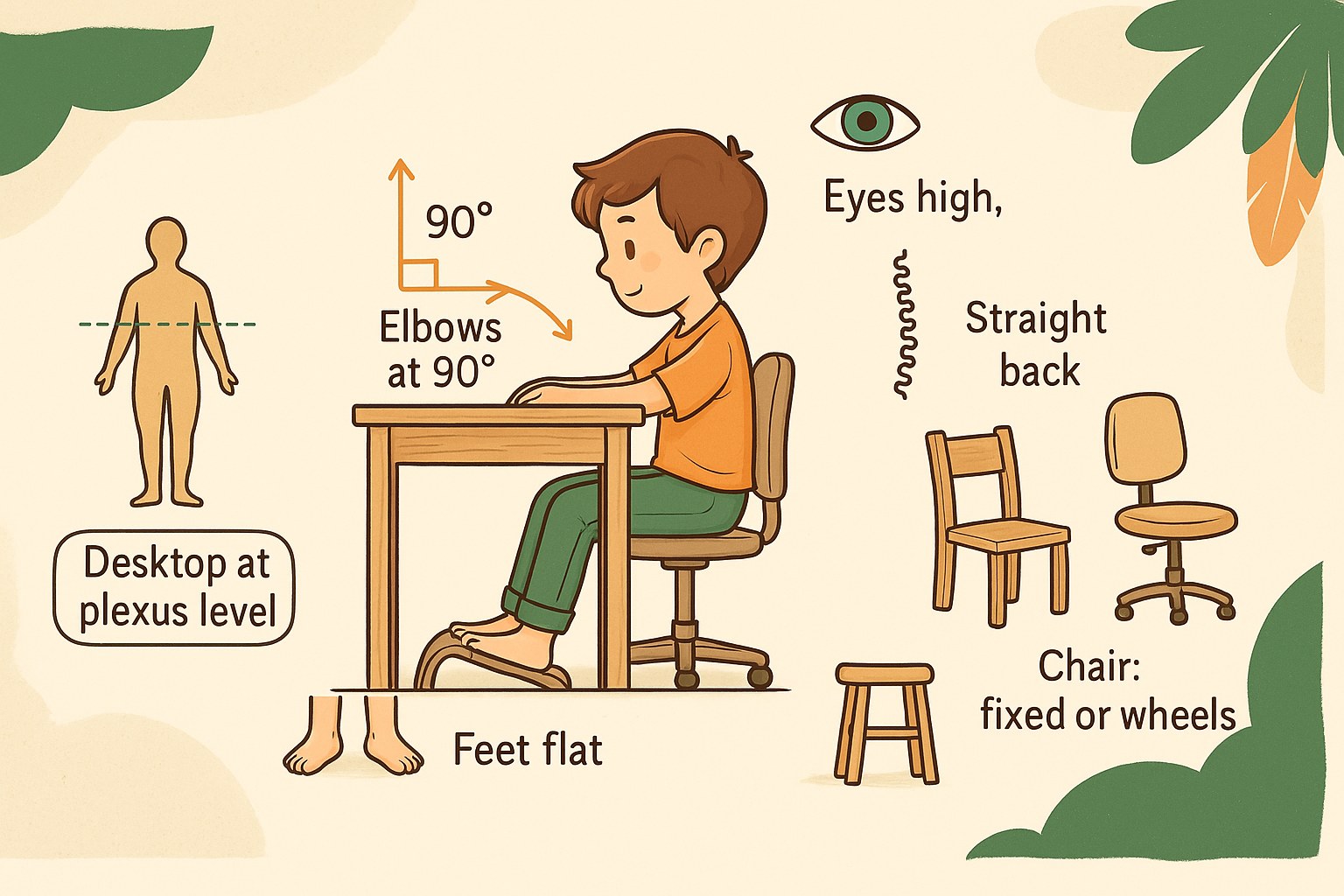
Measure your child while they’re sitting down. The desktop should reach exactly to the level of their solar plexus. That’s the perfect benchmark for great comfort during homework.
Then apply the 90-degree rule for the elbows. The arms should rest naturally on the table. This stops the shoulders from hunching up, which limits tiring neck tension.
The feet should stay flat on the floor. The ground supports the whole weight of the body.
🪑 Choosing between a fixed chair and a wheeled one
A fixed chair offers reassuring stability for little ones in preschool. It limits distractions and falls. Concentration often begins with a seat firmly anchored to the floor.
Teenagers prefer the freedom of wheels so they can move around flexibly. The backrest should then follow the curve of the lower back. That’s essential to support a back that’s growing fast.
Also check the padding of the seat. Good-quality foam prevents pins and needles.
🧍 Adopting a healthy posture for the back
The gaze should fall naturally on the top of the notebook. The head shouldn’t tip forward. Keeping a reading distance of thirty centimetres is the golden rule.
If the legs dangle, add a footrest. This accessory relieves the pressure under the thighs. The lower back will thank you straight away.
Encourage regular movement to make a workspace that really works. Nobody should sit frozen in place. Stretching or standing up gets the blood flowing again efficiently.
🪑 Finding the right furniture for your child’s age
Now that you understand ergonomics, let’s see how the furniture should adapt in practice to each stage of growth, from early childhood to the teenage years.
👶 Setting up a first corner for preschool
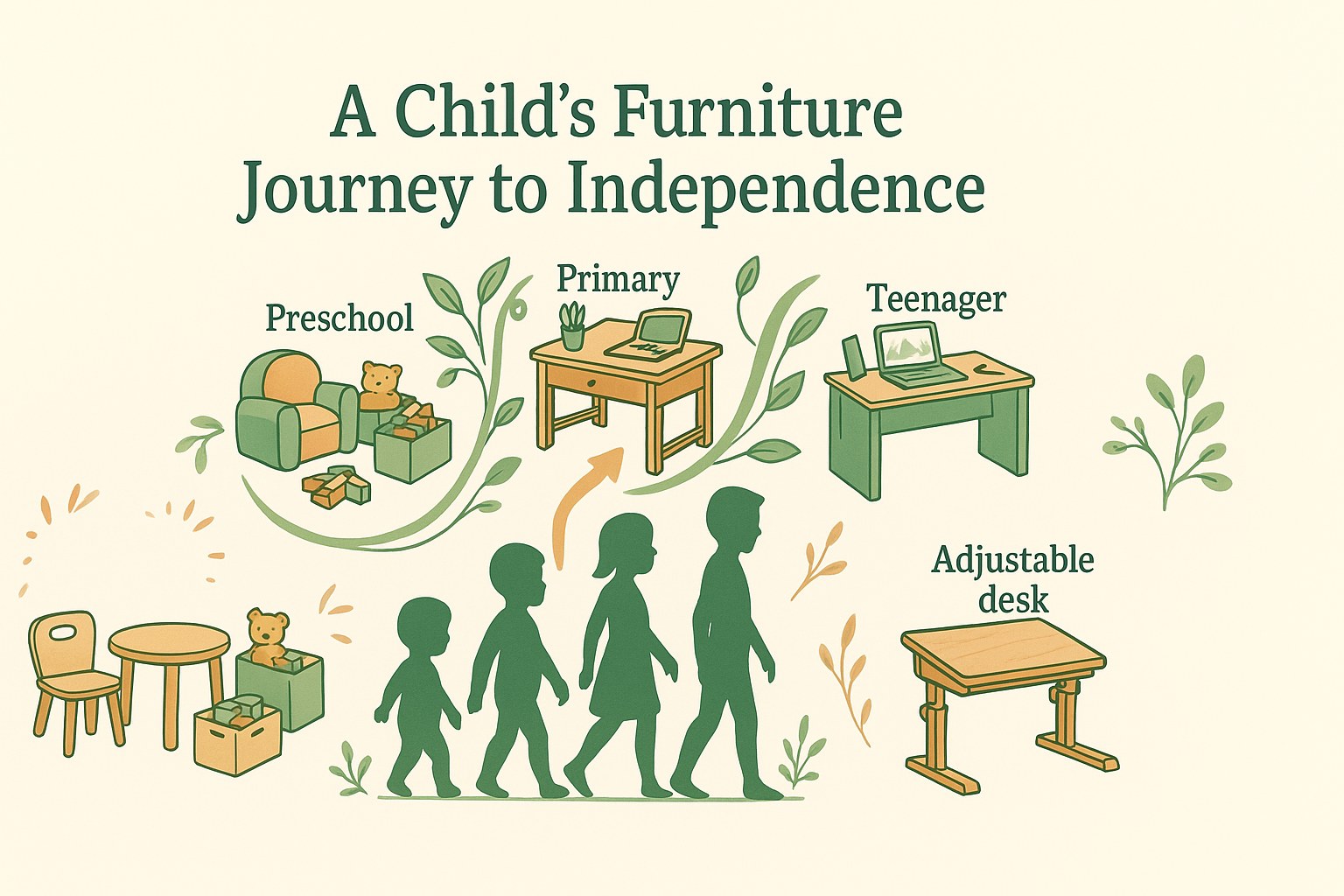
Go for low furniture suited to little ones’ size. Everything should stay within reach without needing an adult. This boosts their independence and confidence every day.
Choose open storage with colourful bins. The child spots their felt-tips immediately. They also tidy them away much faster.
Make safety a priority with rounded-edge finishes. Sturdy materials like solid wood stand up to knocks. We skip glass or jutting metal here.
🧒 Moving up to a big-kid desk for primary school
The adjustable desk is a really clever choice. It follows the pupil’s growth thanks to its adjustable legs. It’s a purchase that lasts.
Give them a fairly wide work surface. Big notebooks and pencil cases quickly spill everywhere. A desktop sixty centimetres deep then comes in very handy.
Add drawers to store those first lessons. Organisation is learned gently with compartments for the erasers.
🧑 Adapting the space to a teenager’s needs
Set up the computer smoothly on the desk. The desktop should hold the screen and keyboard comfortably. Discreet cable routing avoids the visual clutter. It’s vital for their digital comfort.
Go for a plain, clean design. The teenager wants a space that finally reflects their maturity. We forget overly childish colours.
Reinforce the overall structure. Use becomes intensive with the weight of textbooks and often-heavy computer gear.
💡 Playing with light to avoid eye strain
Choosing the furniture isn’t enough; without controlled lighting, eye strain will quickly ruin all those concentration efforts.
🪟 Positioning the desk in relation to the windows
Place the desk at a right angle to the window. This lets you enjoy natural daylight without being dazzled. It’s the best setup for working during the day without a lamp.
Absolutely avoid having your back to the glass. Reflections on the screen are unbearable and tire the eyes. We want soft light that bathes the workspace from the side.
Fit Venetian blinds or sheer curtains. They let you adjust the amount of sunlight depending on the time of day and the brightness outside.
💡 Choosing a high-performing desk lamp
Pick a good-quality LED bulb. The colour temperature should be neutral, close to daylight. This keeps the child alert without harming the retina.
Place the lamp on the opposite side to the writing hand. This stops you from casting the arm’s shadow onto the paper.
Go for a model with an articulated arm. The child can aim the beam of light exactly where they need it. It’s an essential precision tool for detailed work.
👀 Protecting the eyes from artificial light
Switch on some ambient light as well as the desk lamp. The harsh contrast is tiring.
- Lower the screen brightness in the evening.
- Turn on the blue-light filter.
- Keep an arm’s length distance (about 50 cm).
- Wipe the dust off the screen regularly.
Clean the bulbs and lampshades regularly. Dust reduces the light’s efficiency and dulls the room’s overall mood.
📦 Storage solutions for small spaces
Even in the tiniest bedrooms, there are clever tricks to fit in a desk and all its accessories without feeling cramped.
🚪 Transforming a cupboard or a tight nook
Make the most of wall recesses with made-to-measure shelves. Every centimetre counts in a small space. You turn a useless alcove into a perfectly functional work zone.
Use the height all the way up to the ceiling. High shelves hold the folders.
Think about a retractable or fold-down desktop. Once homework is done, the desk disappears to free up the passage. It’s the ultimate solution for multi-purpose bedrooms where space is sorely lacking.
✏️ Managing supplies in a shared space
Give each child a colour code. Blue bins for one, green for the other. This avoids arguments and makes tidying easy right after school.
Adopt a shared trolley on wheels. It moves around easily between the two workstations.
Separate the zones with an open piece of furniture. A bookcase-style shelf acts as a light partition without blocking the light. Each child then has their own clearly marked territory.
🗂️ Keeping order with sorting systems
“A tidy desk reflects a clear mind, ready to learn new things every day.”
Systematically label every box or drawer. The child knows exactly where to put away their felt-tips and notebooks.
Set up a daily decluttering ritual. Five minutes is enough to clear the desktop each evening. It’s the best way to start the next day with completely fresh motivation.
🎯 Creating a focus bubble with no distractions
The physical setup is a foundation, but the visual and technical atmosphere plays a major role in the child’s ability to stay focused.
🎨 Choosing colours that help with study
Go for blue or green tones on the walls. These colours soothe the nervous system and encourage deep thinking. They turn the desk corner into a haven of peace.
Avoid wallpaper with overly busy patterns. They catch the eye and distract the child during reading.
Add touches of yellow to spark creativity. A pencil pot or a desk mat in this colour wakes up the mind. It’s a simple trick to energise the space without cluttering it.
🔌 Tidying away technology and cables
Hide the electrical wires in dedicated cable trays. A tangle of cables creates stressful visual mess. Technical tidiness helps keep a calm, professional work environment.
Raise the laptop with a suitable stand. This lines the screen up with the eyes and stops slouching.
Fit a power strip with an accessible switch. The child can turn off all their devices with a single move in the evening. It’s a good habit to save energy and cut unnecessary standby power.
✂️ Separating the homework corner from the creative corner
Reserve the main desk for school activities only. The brain then links this specific spot with intellectual effort. This mental separation is crucial for getting down to work quickly.
Create a secondary space for drawing or modelling. A small table is enough to set creativity free.
Mark the work zone with a specific rug. This visual boundary on the floor clearly defines the limits of the “focus bubble”. It’s a strong signal to the rest of the family.
🎨 Personalising the work corner so it feels like theirs
Finally, let’s not forget that this desk should be a place of pleasure; personalisation and durability make it a truly unique space.
🖼️ Decorating with inspiring accessories
Fit a pegboard above the desktop. It’s the ideal accessory for hanging pots, scissors or photos. The child can change their setup whenever they feel like it.
Create a mood board to show off achievements and goals. You pin up good marks or drawings they’re proud of. This strengthens their sense of accomplishment every day. It’s a powerful, visual motivation engine.
Choose colourful accessories. Original pots make tidying up far more fun.
🌿 Choosing durable, healthy materials
Pick certified solid wood for the desktop. It’s a fine material that lasts for years without ageing. This way you avoid the toxic glues found in cheap furniture.
| Material | Durability | Care | Health Impact |
|---|---|---|---|
| Solid wood | 5/5 | Soft damp cloth | Excellent (no VOCs) |
| Laminate | 3/5 | Sponge and soap | Average (watch the glues) |
| Metal | 4/5 | Quick dusting | Good (lead-free paint) |
| Recycled plastic | 3/5 | Easy to clean | Safe (PP or HDPE) |
Check the quality of the hinges and runners. Drawers that glide effortlessly guarantee pleasant use for a very long time.
🔨 Customising an old piece of furniture with DIY
Bring an old desk back to life with chalkboard paint. The desktop then becomes a giant surface for self-expression for sums or drawings. It’s a cheap and very original solution.
Replace the original handles with modern ones. This little detail radically changes the overall look of the furniture.
Line the back of the shelves with patterned wallpaper. This adds depth and an instant touch of whimsy. The child makes the space their own in a completely unique way.
Setting up a child’s desk corner calls for ergonomics, careful lighting and clever storage to boost concentration. By adjusting the furniture height to their growth, you give your little one lasting, motivating comfort. Create that inspiring bubble right now to watch their independence blossom day after day.
❓ FAQ
📐 What is the ideal height for a child’s desk?
For your little one to sit comfortably, it all comes down to centimetres and angles. The golden rule is the 90-degree one: once seated, their elbows should form that right angle to rest naturally on the desktop, without the shoulders rising up. That’s the secret to avoiding nasty tension in the neck.
In practice, for the youngest in preschool, aim for a height between 50 and 56 cm. For primary-school children, you go up to between 58 and 74 cm, while teenagers feel better with a desktop between 66 and 76 cm. The ideal choice remains the adjustable desk that follows their growth over the years.
🪑 Is it better to choose a fixed chair or a wheeled one for working?
The choice depends mostly on your child’s age and temperament. For little ones in preschool, I often suggest a fixed chair. It gives them better stability, avoids distractions (or chair races around the bedroom!) and really helps them focus on their first drawings.
For older children and teenagers, wheels bring welcome flexibility. In every case, check that the backrest properly supports the curve of the back and that the seat is soft enough. Don’t forget: the feet must definitely rest flat on the floor. If the chair is too high, a small footrest will do the trick perfectly.
🧍 How can I help my child keep a good posture during homework?
Try to keep the “90-90-90” rule in mind: right angles at the elbows, hips and knees. The back should stay in contact with the backrest. To relieve their eyes and neck, teach them to place their gaze at the top of their notebook or at screen height, without tipping the head forward.
A parent’s little tip: encourage active breaks! Staying frozen for too long is good for no one. Every 15 or 20 minutes, stretch, stand up or move around a bit. It gets the circulation going and, believe me, concentration comes back much faster after moving those legs a little.
💡 How do I light the desk corner well to avoid eye strain?
Natural light is our best ally. If possible, place the desk at a right angle to the window. This avoids being dazzled head-on or getting annoying reflections on the screen if you sit with your back to the glass. Small blinds let you adjust the brightness depending on the time of day.
For detailed work, a desk lamp with a neutral-light LED bulb is essential. A really simple tip: place the lamp on the opposite side to the writing hand (on the right for a left-hander, on the left for a right-hander). That way, the arm’s shadow won’t cover what they’re writing in their notebook.
🏠 What are your tips for fitting a desk into a small bedroom?
When space is tight, you have to be clever and use the height! You can turn a cupboard or a wall recess into a work corner with made-to-measure shelves. High shelves are perfect for storing what you don’t use every day, freeing up the floor space.
The fold-down desktop is also a magic solution: once the lessons are over, you fold it all away and the bedroom gets its play area back. For supplies, a trolley on wheels or stackable storage bins help keep a minimalist, clutter-free desk, which is far more soothing for the mind.
